Libraries
For creating this chart, we will need to load the following libraries:
- pandas for data manipulation
- matplotlib for creatin the chart
numpyfor smoothing the chart
import pandas as pd
import numpy as np
import matplotlib.pyplot as pltDataset
The dataset can be accessed using the url below.
It contains data about x-men and the number of times they appeared in the comics between the 60's and the 90's.
url = 'https://raw.githubusercontent.com/holtzy/The-Python-Graph-Gallery/master/static/data/mutant_moneyball.csv'
df = pd.read_csv(url)Data cleaning
In order to make the data ready for the chart, we will need to clean it a bit.
Name of the x-men
Since the name of the x-men is written in camelCase, we will need to split it into two words. For example, scottSummers will become Scott Summers.
def format_name(s):
    if " " in s:
        return s
    formatted_string = ""
    for i, char in enumerate(s):
        if char.isupper() and i != 0:
            formatted_string += " " + char
        else:
            formatted_string += char
    if formatted_string:
        formatted_string = formatted_string[0].upper() + formatted_string[1:]

    return formatted_string


df['Member'] = df['Member'].apply(format_name)

df = df[['Member', 'TotalIssues60s', 'TotalIssues70s',
         'TotalIssues80s', 'TotalIssues90s']]
df.set_index('Member', inplace=True)Transpose the data
The data is currently in a wide format, which means that one row represent one x-men and the columns represent the value for eachd decade.
We will need to transpose it to a long format, where each row represents a decade and the columns represent the x-men.
# transpose the dataframe
df_transposed = df.T

decades = ['1960s', '1970s', '1980s', '1990s']  # values of the x-axis
members = df_transposed.columns  # name of the x-mens for the legend
issues_list = df_transposed.T.values.tolist() # values of the x-mendf_transposed| Member | Warren Worthington | Hank Mc Coy | Scott Summers | Bobby Drake | Jean Grey | Alex Summers | Lorna Dane | Ororo Munroe | Kurt Wagner | Logan Howlett | ... | Rachel Summers | Eric Magnus | Alison Blaire | Longshot | Jonathan Silvercloud | Remy Le Beau | Jubilation Lee | Lucas Bishop | Betsy Braddock | Charles Xavier |
|---|---|---|---|---|---|---|---|---|---|---|---|---|---|---|---|---|---|---|---|---|---|
| TotalIssues60s | 61 | 62 | 63 | 62 | 63 | 8 | 9 | 0 | 0 | 0 | ... | 0 | 13 | 0 | 0 | 0 | 0 | 0 | 0 | 0 | 39 |
| TotalIssues70s | 35 | 38 | 69 | 35 | 58 | 13 | 13 | 36 | 36 | 36 | ... | 0 | 7 | 0 | 0 | 0 | 0 | 0 | 0 | 0 | 46 |
| TotalIssues80s | 20 | 9 | 56 | 6 | 14 | 43 | 19 | 121 | 84 | 115 | ... | 23 | 18 | 43 | 35 | 11 | 0 | 6 | 0 | 45 | 61 |
| TotalIssues90s | 23 | 10 | 9 | 20 | 29 | 4 | 7 | 33 | 0 | 16 | ... | 1 | 3 | 2 | 0 | 28 | 17 | 17 | 16 | 14 | 23 |
4 rows × 26 columns
Simple streamgraph
Thanks to the stackplot() function from matplotlib, it is possible to create a simple streamgraph.
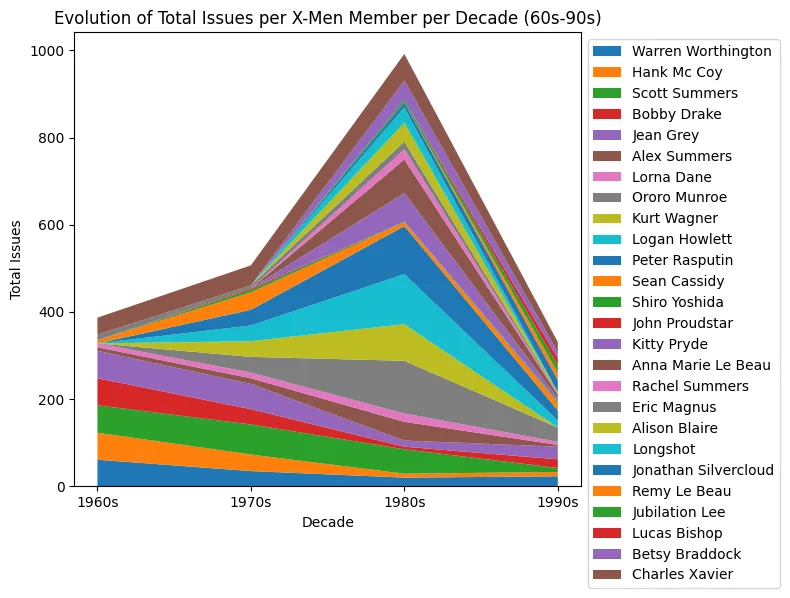
decades = ['1960s', '1970s', '1980s', '1990s']  # values of the x-axis
members = df_transposed.columns  # name of the x-mens for the legend
issues_list = df_transposed.T.values.tolist()  # values of the x-men

fig, ax = plt.subplots(figsize=(8, 6))
ax.stackplot(decades, issues_list, labels=members)
ax.set_title('Evolution of Total Issues per X-Men Member per Decade (60s-90s)')
ax.set_ylabel('Total Issues')
ax.set_xlabel('Decade')
ax.legend(loc='upper left', bbox_to_anchor=(1, 1))

fig.tight_layout()
plt.show()Custom colors
The color we will use is based on the value of the total number of appearances, which means that we have to compute it first.
Then, we create a list of colors using the cm module from matplotlib.
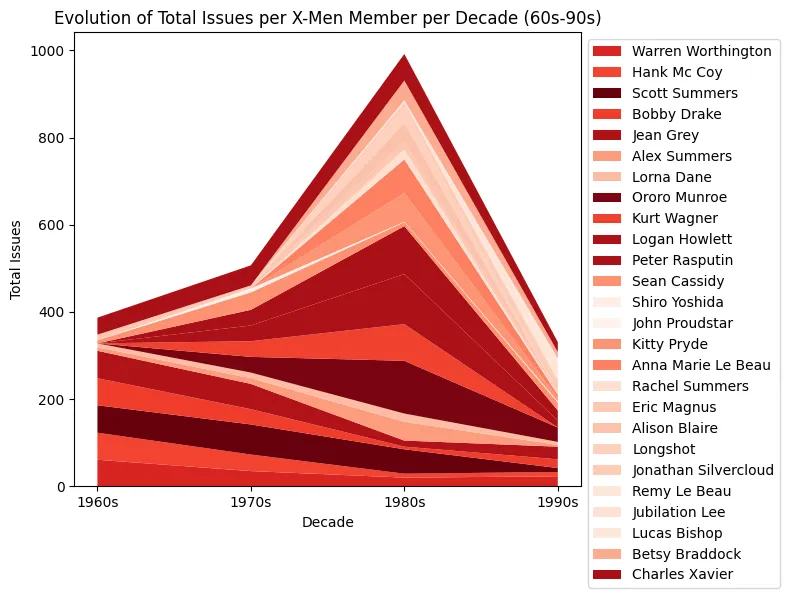
decades = ['1960s', '1970s', '1980s', '1990s']  # values of the x-axis
members = df_transposed.columns  # name of the x-mens for the legend
issues_list = df_transposed.T.values.tolist()  # values of the x-men

# calculate the normalized totals to generate the colors
total_issues_per_member = np.sum(issues_list, axis=1)
normalized_totals = total_issues_per_member / np.max(total_issues_per_member)
cmap = plt.cm.Reds
colors = cmap(normalized_totals)

fig, ax = plt.subplots(figsize=(8, 6))
ax.stackplot(decades, issues_list, labels=members, colors=colors)
ax.set_title('Evolution of Total Issues per X-Men Member per Decade (60s-90s)')
ax.set_ylabel('Total Issues')
ax.set_xlabel('Decade')
ax.legend(loc='upper left', bbox_to_anchor=(1, 1))

fig.tight_layout()
plt.show()Custom order
If we want to change the order in which x-men are displayed, we can use the argsort() function from numpy.
It will gives us the index of the x-men, sorted by the total number of appearances. Then, we can use this index to reorder the list of values, name and colors.
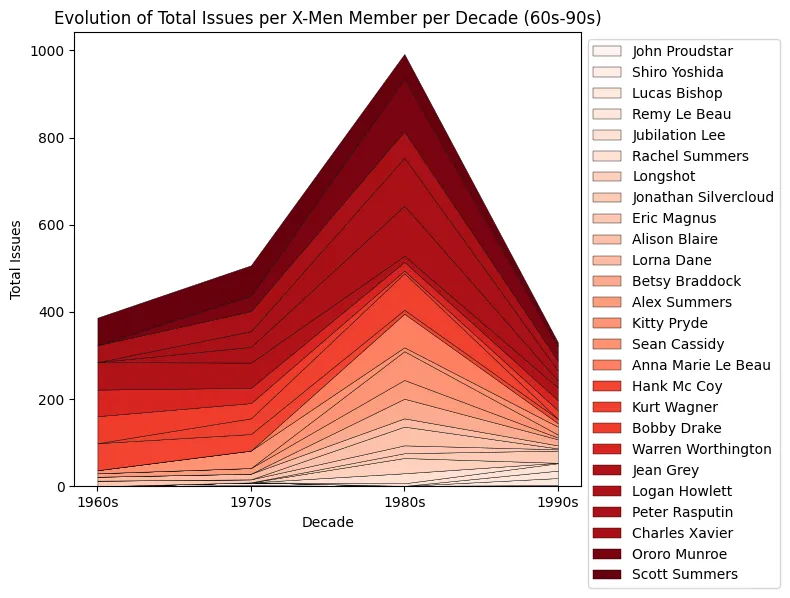
# calculate the normalized totals
total_issues_per_member = np.sum(issues_list, axis=1)
normalized_totals = total_issues_per_member / np.max(total_issues_per_member)
cmap = plt.cm.Reds
colors = cmap(normalized_totals)

# sort the members by total issues
sorted_indices = np.argsort(total_issues_per_member)
sorted_issues_list = np.array(issues_list)[sorted_indices]
sorted_members = np.array(members)[sorted_indices]
sorted_colors = colors[sorted_indices]

# plotting
fig, ax = plt.subplots(figsize=(8, 6))
ax.stackplot(
    decades,
    sorted_issues_list,
    labels=sorted_members,
    colors=sorted_colors,
    edgecolor='black',
    linewidth=0.3
)

# setting the title and labels
ax.set_title('Evolution of Total Issues per X-Men Member per Decade (60s-90s)')
ax.set_ylabel('Total Issues')
ax.set_xlabel('Decade')
ax.legend(loc='upper left', bbox_to_anchor=(1, 1))

# plotting
fig.tight_layout()
plt.show()Change stream style
If you want to smooth the stream, we need to use the interp1d function from scipy.
This function is a bit particular since it is used to create a function that can be used to interpolate the data. We give it a list of x and y values, and it returns a function that can be used to get the y value for any x value.
Then, we can use this function to create a new list of y values that will be used to create the streamgraph.
from scipy.interpolate import interp1d

# instead of 4 date points, we will use 40
decadesforsmooth = [1960, 1970, 1980, 1990]
new_decades = np.linspace(min(decadesforsmooth), max(
    decadesforsmooth), len(decadesforsmooth) * 10)

# interpolating each member's issues list for the new_decades
smoothed_issues_list = []
for issues in sorted_issues_list:
    interp_func = interp1d(
        decadesforsmooth,
        issues,
        kind='quadratic'
    )
    smoothed_issues = interp_func(new_decades)
smoothed_issues_list.append(smoothed_issues)Then, the rest of the code mainly stays the same. We just add a baseline='wiggle' argument to the stackplot() function to make the streamgraph look better.
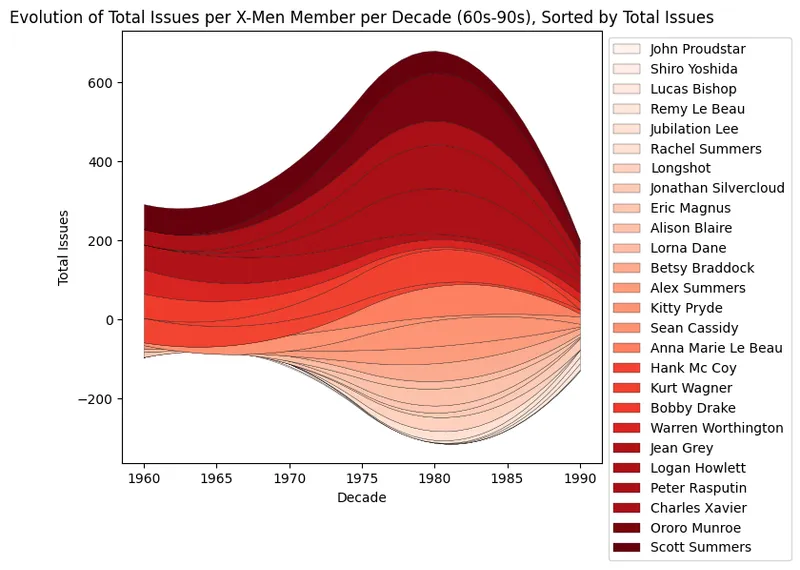
# calculate the normalized totals
total_issues_per_member = np.sum(issues_list, axis=1)
normalized_totals = total_issues_per_member / np.max(total_issues_per_member)
cmap = plt.cm.Reds
colors = cmap(normalized_totals)

# sort the members by total issues
sorted_indices = np.argsort(total_issues_per_member)
sorted_issues_list = np.array(issues_list)[sorted_indices]
sorted_members = np.array(members)[sorted_indices]
sorted_colors = colors[sorted_indices]
sorted_issues_list = [sublist[:-1] for sublist in sorted_issues_list]

# create the chart
fig, ax = plt.subplots(figsize=(8, 6))
ax.stackplot(
    new_decades,
    smoothed_issues_list,
    labels=sorted_members,
    colors=sorted_colors,
    edgecolor='black',
    linewidth=0.2,
    baseline='wiggle'
)

# setting the title and labels
ax.set_title(
    'Evolution of Total Issues per X-Men Member per Decade (60s-90s), Sorted by Total Issues')
ax.set_ylabel('Total Issues')
ax.set_xlabel('Decade')
ax.legend(loc='upper left', bbox_to_anchor=(1, 1))

# plotting
fig.tight_layout()
plt.show()Going further
This article explains how to create a streamgraph and how to customize it.
You might want to check this beautiful streamgraph entirely built with matplotlib.