Libraries
First, you need to install the following librairies:
- matplotlib is used for plot creating the charts
numpyis used to generate some datapandasis used to put the data into a dataframe
import matplotlib.pyplot as plt
import pandas as pd
import numpy as npDataset
In order to be as exhaustive as possible, we need to create a dataset with enought variety.
Numeric1andNumeric2are positively correlated variables, withNumeric2being calculated as Numeric1 plus some random noise.Numeric3is a negatively correlated variable toNumeric1.
We use the random.normal() function from numpy in order to create randomly distributed variables.
# Generate data for three numeric columns
sample_size = 1000

# Positively correlated variables
variable1 = np.random.normal(0, 1, sample_size)
variable2 = 2 * variable1 + np.random.normal(10, 1, sample_size)

# Negatively correlated variables
variable3 = -2 * variable1 + np.random.normal(0, 10, sample_size)

# Create a DataFrame
df = pd.DataFrame({
    'Numeric1': variable1,
    'Numeric2': variable2,
    'Numeric3': variable3
})Initial graph
Here's the chart we're going to customize. It consists of a 2x2 frame with different types of graphics, but without any customization (all default argument).
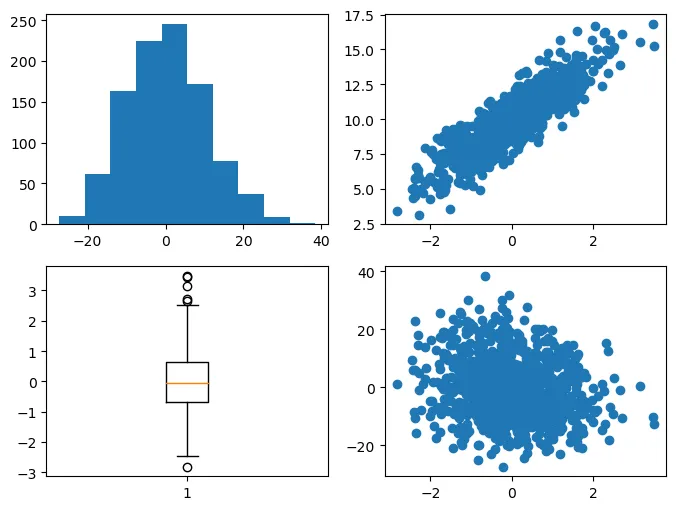
# Create a 2x2 subplot layout
fig, axes = plt.subplots(nrows=2,
                         ncols=2,
                         figsize=(8, 6))

axes[0, 0].hist(df['Numeric3']) # Histogram in the upper left
axes[0, 1].scatter(df['Numeric1'], df['Numeric2']) # Scatter plot in the upper right
axes[1, 0].boxplot(df['Numeric1']) # Boxplot in the lower left
axes[1, 1].scatter(df['Numeric1'], df['Numeric3']) # Scatter plot in the lower right

# Show the plots
plt.show()Customize the layout of the chart
Here are all the customization elements we are going to add:
- change the division of each subgraph on the global graph using the
add_gridspec()function - create a wide variety of titles: size, color, font, position, etc
- add different grids for each sub-graph using the
grid()function - add an annotation that says how cool our chart is using the
text()function only
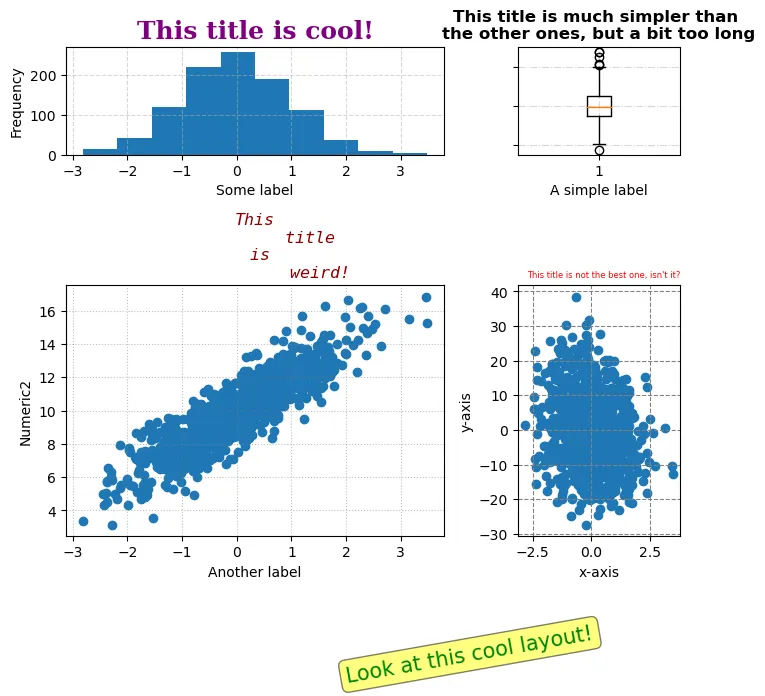
# Create a 2x2 subplot layout
fig = plt.figure(figsize=(7, 6))

# Define the grid layout
gs = fig.add_gridspec(2, 2,
                 width_ratios=[7, 3],
                 height_ratios=[3, 7])

# Add annotation to the right
fig.text(0.5, -0.1, 'Look at this cool layout!',
         fontsize=15, color='green', rotation=10,
         verticalalignment='center',
         bbox=dict(boxstyle='round',
                   facecolor='yellow',
                   alpha=0.5))


# Plot 1: Histogram in the upper left
ax1 = fig.add_subplot(gs[0, 0])
ax1.hist(df['Numeric1'])
ax1.set_title('This title is cool!',
              fontsize=18, fontweight='bold',
              color='purple', fontfamily='serif')
ax1.grid(True, linestyle='--', alpha=0.5)


# Plot 2: Scatter plot in the lower left
ax2 = fig.add_subplot(gs[1, 0])
ax2.scatter(df['Numeric1'], df['Numeric2'])
ax2.set_title('This\n           title\n is\n             weird!',
              fontsize=12, fontstyle='italic',
              color='darkred', fontfamily='monospace')
ax2.grid(True, linestyle=':', color='gray', alpha=0.5)


# Plot 3: Boxplot in the upper right
ax3 = fig.add_subplot(gs[0, 1])
ax3.boxplot(df['Numeric1'])
ax3.set_title('This title is much simpler than \nthe other ones, but a bit too long',
              fontsize=12, fontweight='bold',
              color='black', fontfamily='sans-serif')
ax3.grid(True, linestyle='-.', alpha=0.5)


# Plot 4: Scatter plot in the lower right
ax4 = fig.add_subplot(gs[1, 1])
ax4.scatter(df['Numeric1'], df['Numeric3'])
ax4.set_title("This title is not the best one, isn't it?",
              fontsize=6, color='red',
              loc='right')
ax4.grid(True, linestyle='--', color='gray', alpha=1)


# Add labels and ticks
ax1.set_xlabel('Some label')
ax1.set_ylabel('Frequency')
ax2.set_xlabel('Another label')
ax2.set_ylabel('Numeric2')
ax3.set_xlabel('A simple label')
ax3.set_yticklabels([])
ax4.set_xlabel('x-axis')
ax4.set_ylabel('y-axis')

# Adjust layout
plt.tight_layout()

# Show the plots
plt.show()Going further
This post explains how to create a very customized layout in matplotlib.
For more examples of how to create or customize your plots with matplotlib, see the matplotlib section. You may also be interested in how to custom your fonts with matplotlib.